


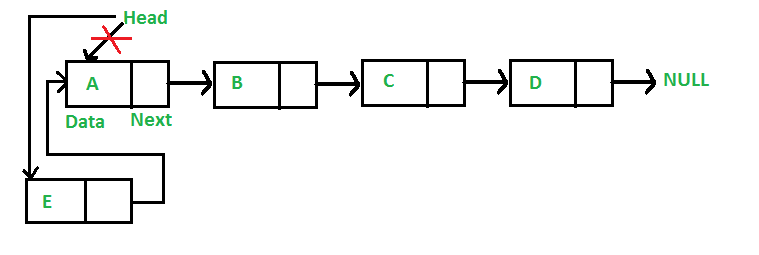
Linked List (Linked list) is one of the structured data frameworks in the installer. It is displayed from a a series of nodes, where each node stores the value (value) and a pointer (pointer) points to the next node in the list. This structure is particularly useful when working with dynamic data or performing frequent insertion and deletion operations.
Note: This article is for beginners. The author shares their self-learning process, hoping to inspire and reinforce knowledge for the community. If you already have experience, continue practicing at a higher level or try rewriting and explaining it – as this is the most effective way to memorize and train algorithmic thinking.
1. Understanding Linked Lists through a visual example.
Imagine Linked List like string ticket trên Jira or Trello – each ticket has a link “Next” leads to the next ticket.
In fact, you'll find linked lists in many places:
- Function Undo/Redo Excel or VS Code are prime examples of this. Doubly Linked List:
- Ctrl + Z → go backward (prev)
- Ctrl + Y → Go to (next)
- Web browser when you press Back or Forward — that is, you are moving in a Two-way linked list Displays browsing history.
2. Common Types of Linked Lists
Singly Linked List
Each node has only one pointer. next points to the next node.
- Browse words
head → tailBut there's no turning back. - Advantages: simple, memory-saving, fast insertion or deletion at the beginning of the list (O(1)).
- Disadvantage: cannot be accessed backward; to find a node previously, you have to traverse from the beginning.
- Typical exercises: LeetCode 206 – Reverse Linked List.
Doubly Linked List
Each node has both pointers. prev and next, allowing for bidirectional browsing.
- Browsing is possible in both directions.
- Inserting/deleting in the middle is more convenient than a single list.
- It takes extra memory to save.
prev. - Caution is needed when updating the cursor to avoid incorrect pointing errors.
Circular Linked List
Last node (tail) points back to the first node (head), forming a closed loop.
- Browsing from any node will traverse the entire list.
- Application in round-robin scheduling or systems that require continuous loops.
- A clear stopping condition needs to be defined to avoid infinite loops.
3. Comparing Linked Lists and Arrays
| Criteria | Array | Linked List |
|---|---|---|
| Access by index | O(1) | O(n) |
| Insert/Delete Element | O(n) | O(1) (if there is a pointer) |
| Memory | Fixed allocation | More dynamic and flexible. |
| Application | DB Index, Static Array | Undo/Redo, Cache, LRU Cache |
4. Featured LeetCode exercises
- 206. Reverse Linked List → Reverse the cursor direction using three variables
prev,curr,next. - 141. Linked List Cycle → Detect loops using two fast-slow pointers (
fast–slow pointers). - 21. Merge Two Sorted Lists → Merge the two sorted lists, carefully pointing the pointer correctly.
- 146. LRU Cache → Combine HashMap (O(1) lookup) and Doubly Linked List (O(1) reorder, delete).
5. Basic Python Code Examples
class Node:
    def __init__(self, val):
        self.val = val
        self.next = None

class LinkedList:
    def __init__(self):
        self.head = None

    def insert_head(self, val):
        node = Node(val)
        node.next = self.head
        self.head = node

    def insert_end(self, val):
        node = Node(val)
        if not self.head:
            self.head = node
            return
        curr = self.head
        while curr.next:
            curr = curr.next
        curr.next = node

    def print_list(self):
        curr = self.head
        while curr:
            print(curr.val, end=" -> ")
            curr = curr.next
        print("None")
6. Effective ways to learn and practice
Before you start coding, please Draw a Linked List diagram on paper.Most errors when working with Linked Lists stem from pointing the wrong cursor.pointer), so be sure to understand the direction of next and prev before running the code.
- Focus on four groups of exercises: reverse list, detect cycle, merge lists, remove node, and LRU cache.
- In backend/frontend interviews, you'll often be asked about the trade-off between Arrays and Linked Lists.
- Prepare templates
NodeandLinkedListTo code faster. - Always consider the time/space complexity beforehand to optimize the solution.
7. The mindset for training is important.
When practicing linked lists, start with a short list: [1 → 2 → 3 → None] or [10 → 20 → 30 → 40 → None].
With a short list, it's easy to observe the changes after each operation. insert, delete, reverseIf you encounter a pointing error, printing a small list helps in quick detection. Once your logic is solid, try a larger test case.
Additionally, please write more. helper function like print_list() or to_array() To visualize the data after each step.
8. Conclusion
- Linked Lists are the foundation of many other data structures such as Stack, Queue, Graph, and Cache.
- Understanding the nature of pointers is more important than memorizing formulas.
- Draw – Simulate – Code – Optimize: that's the most effective learning cycle.
Summary: Mastering Linked Lists will give you a deeper understanding of how data operates in memory and expand your thinking to more complex structures like Trees, Graphs, Heaps, and HashMaps. Understanding the fundamentals first, then optimizing – that's the right mindset when learning algorithms.
Add a Comment